
- Field Service Management
- Maintenance
- Software
9 Practical Steps to Deploy Field Service Management Software
Deploying a field service management solution is like a construction project in that you need to start with a feasibility study and a solid foundation. And, like a construction project, there will be challenges along the way. To help avoid nasty surprises, here are 9 steps that serve as a practical guide to deployment.
Define your needs
1: Evaluate existing resources
Before you start looking at different field service management solutions, take stock of your resources to ensure you select a solution that fits within your means. For example, an on-premises solution that is installed on your company’s servers requires an array of secure computers and a trained IT team that can support daily operations as well as any required changes or updates to the solution. In contrast, a Software as a Service (SaaS) solution does not require specific IT resources. It can be deployed very quickly and, because it is cloud-based, it’s highly scalable.
2: Define field service management requirements
To determine which maintenance software is right for your business, you need to identify your requirements. From a technical perspective, consider compatibility with your existing customer relationship management (CRM) software to improve service tracking. Some solutions, such as the one offered by Praxedo, are open and provide connectors and APIs that allow you to easily integrate your new software with your information systems. Get your technicians involved in developing your requirements. They’re in the best position to tell you what they’re missing in the field. And, if they participate in choosing the new solution, they will be more likely to use it.
3: Create a project team
A field service management solution has the potential to simplify employee tasks provided your employees are willing and able to use it. Whether you’re making your initial move to paperless processes or simply switching from one solution to another, preparation is key to your success. The best strategy is to create a dedicated project team that includes all stakeholders — management, operations experts, dispatchers, field technicians and contact center staff.
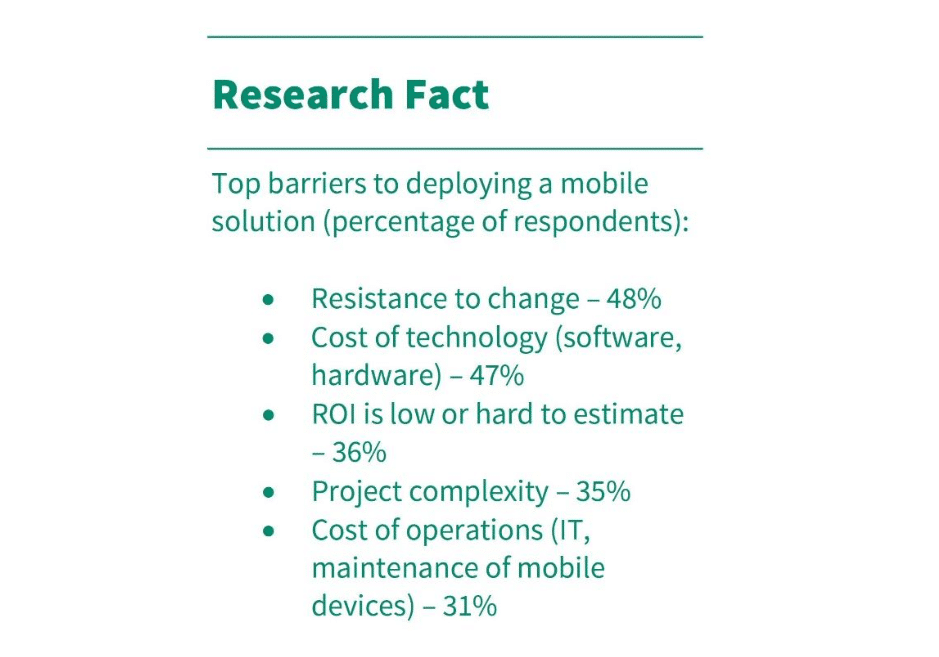
Source : « The Mobile Technician_The Evolution of the Connection in 2015 », Aberdeen Group
According to a 2015 Aberdeen Group study, 48% of respondents cited resistance to change as the number one obstacle to adopting paperless processes. This is why it’s crucial to build awareness. Once a climate of resistance to change is established, it makes evolution far more complicated.
Choose the software that best suits your business requirements
4: Educate yourself about the industry
To choose the ideal field service management solution, you need to know what’s going on in the industry. There’s a lot of innovation underway and the technologies used are evolving very quickly. Artificial intelligence (AI), the Internet of Things (IoT), virtual and augmented reality and the cloud are just a few examples of innovations that are now being used. With industry insight, you’ll be in a better position to benchmark potential solutions and to compare technologies, capabilities and prices to ensure you select the software that is most closely aligned with your needs and your existing resources.
5: Determine whether you need a SaaS solution or an on-premises solution
Assuming you’re interested in using advanced technology, the next step is to determine whether you need a SaaS solution or an on-premises solution. According to 2014 research by Field Service News and Tesseract, some service companies may be resisting transformation due to the cost of traditional field service management solutions. Buying licenses and installing software on individual computers is very expensive and return on investment (ROI) is slow. In contrast, a SaaS solution reduces costs and the subscription price includes regular software updates. Cloud solutions are fast to install, simplify operations and can be accessed from anywhere. As a result, they’re ideal for field service management. And free trials are readily available and easy to access.
6: Choose a customizable solution
Choose field service management software that can be customized for your business. For example, if you have enterprise resource planning (ERP) software, you likely already have basic service management functionality. However, specialized field service management software gives you far more ability to customize route planning. The best way to determine whether the software can be customized for your needs is to check customer references. If the solution vendor has other customers in your industry, you should be able to find testimonials on their website so you can see what they’re saying about the solution.
Consider the big picture to increase confidence
7: Estimate the total deployment cost
Companies often forget to account for the cost of deploying new field service management software. Yet, depending on the capabilities provided in the solution, the cost can be quite high. As a result, it’s very important to determine the total cost of ownership (TCO), which is the actual cost of using the solution. The TCO includes the price of the licenses or annual subscription as well as the cost of:
- Setup and deployment within your company
- Hosting the solution
- Updating the software
8: Train technicians and dispatchers
The availability of deployment support for the software can make or break your decision. But, no matter which solution you choose, you must train dispatchers and technicians. Their preparation determines the success of your deployment. Training is also key to ensure that technicians like using the application.
9: Evaluate support services
Before choosing a field service management solution, evaluate the vendor’s technical support capabilities:
- Is support available 7 days a week?
- Is support included or is it an additional cost?
- Is a subscription required?
- Is support available in your language of business?
Ask yourself these questions before a serious issue occurs and it’s too late. You must be able to count on support from your vendor, especially if you’ve selected a SaaS solution, because there won’t be an internal IT team to maintain the solution or address issues.
Rely on an experienced vendor partner
It can be tempting from a cost perspective to choose a vendor that is new to the field service management industry. However, choosing an unproven vendor is risky because if their operations are not successful, all of your deployment efforts are wasted. The safest option is to choose a recognized market player or a market leader, ideally one that is expanding its business. This will enable you to benefit from software updates that take advantage of the latest technologies as soon as they are available.

Our similar articles.
-
- Productivity
- Maintenance
- Gestion d’interventions
- Optimization
- Technologies
- Productivité
How to optimize equipment maintainability
November 18, 2020
-
- Field Service Management
- scheduling software
- Service Technician
Service Technician Scheduling Software: How to Get More Hours Back in Your Day
August 8, 2023
-
- Field Service Management
- Field Service Software
- field service dispatch
Can Uber-like scheduling management apply to Field Service Dispatch?
April 18, 2024