
- AI in field service management
- fsm
- Microsoft Dynamics 365 Business Central
- Microsoft Dynamics Business Central connector
Future-Proof Your BC Customers: Closing the FSM Functionality Gap
Key Takeaways:
Here’s a quick look at why integrating FSM with Business Central is important:
- Native Business Central service management works, but only for simple service needs.
- Field operations require mobile apps, live scheduling, GPS, and smart automation.
- Business Central field service integration closes the ERP-field execution gap.
- Partners can drive more revenue, retention, and client value with FSM tools.
- Praxedo provides a proven, fast-to-deploy solution for modern service organizations.
If you’re a Microsoft Dynamics 365 partner or consultant, you’ve probably experienced the same friction point over and over again: your customer loves Business Central for its back-office power, but their field operations? That’s a different story.
Today’s service-centric organizations, from HVAC to telecom and utilities, expect more than just work order tracking. They want real-time dispatching, GPS-based technician tracking, mobile-first execution, and a connected field-to-office workflow. These aren’t “nice-to-haves” anymore. They’re expected.
Yet despite its strengths, Dynamics 365 Business Central field service functionality doesn’t fully support those needs out of the box. And the result? Field teams cobble together spreadsheets, mobile notes, or disconnected third-party apps just to get the job done. That’s risky, for your customer and your implementation.
What Business Central Does Well in Service Management
Let’s be clear, Business Central service management is a solid foundation. For many organizations, it manages core service functions beautifully. This solid foundation is why more than 85% of the Fortune 500 trust Microsoft solutions; however, even the best foundation needs the right extensions for field execution.
Scheduling service orders, managing contracts, linking inventory, and processing invoices – all of that is handled efficiently within the native ERP workflows.
This functionality is great for light-service businesses where most work is done in-office or where field work is minimal and straightforward. That’s why service management in Business Central often gets a passing grade, until the field operations start to scale.
But once you add mobile teams, multiple jobs per day, complex dispatching, and the need for real-time updates, Business Central’s limitations become apparent.
4 Clear Indicators Your Customer Has Outgrown Native Service Tools
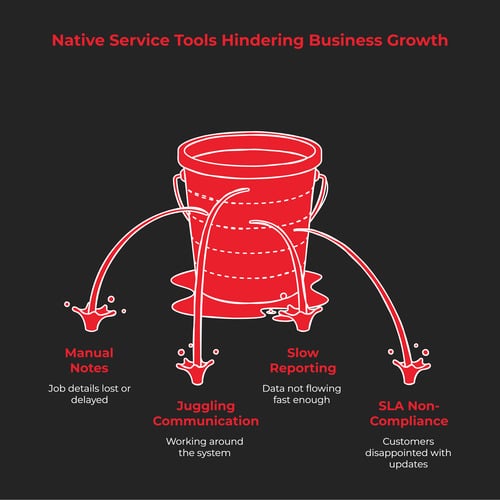
You don’t need deep technical diagnostics to see the red flags. If you’re managing an implementation or support cycle and you see any of the following, it’s a signal that the business is struggling with the functionality gap:
- Technicians still rely on manual notes or paper forms: No mobile visibility means job details get lost or delayed.
- Schedulers are stuck juggling calls, texts, and spreadsheets: They’re working around the system, not in it.
- Service reporting takes days: Field data isn’t flowing back to Business Central fast enough to support invoicing or analysis.
- SLA or compliance requirements aren’t being met: Customers expect real-time updates and proof of service. Without integrated tools, they’re disappointed.
All of this hurts the customer experience and makes the job harder.
Business Central Field Service Integration: What It Looks Like in Practice
Here’s the good news: you don’t have to rip and replace your ERP setup to deliver a modern field service experience. That’s where Business Central field service integration comes in.
Solutions such as Praxedo integrate directly with Dynamics 365 Business Central service management modules, enabling seamless data exchange between the ERP and FSM platforms. Sales orders or service orders created in Business Central can be automatically sent to field techs using Praxedo’s mobile app. Updates, job status, photos, time logs, and digital forms are sent back to the ERP in real-time.
The result? Dispatchers gain smarter scheduling tools, technicians work with a full job context, and back-office teams process invoices faster. And importantly, all of this occurs without duplicating systems or risking data silos.
Praxedo’s integration approach delivers faster deployments, lower costs, and better results, without disrupting your customers’ core ERP investments.
What True FSM Software Adds That BC Can’t Deliver Alone
When you look closely, the missing pieces in the Business Central field service become clearer. Field service isn’t a checklist; it’s a workflow. It requires flexibility, visibility, and intelligent automation.
A full FSM platform adds value in several areas:
- Mobile-first execution: Techs use a dedicated app to view jobs, upload photos, complete digital forms, and capture signatures, even offline.
- Smart scheduling and dispatching: Drag-and-drop tools, automated routing, and technician skill-matching optimize assignments.
- Real-time GPS tracking and ETA sharing: Dispatchers and customers know where the technician is and when they’ll arrive.
- Advanced SLA monitoring: Built-in KPIs and dashboards help service managers track performance and reduce violations.
These are table stakes in today’s service economy, and Dynamics 365 Business Central field service needs a specialized extension to meet them.
With a platform such as Praxedo, your customers get all of the above without having to give up Business Central as their ERP core. It’s not about replacing BC. It’s about making it whole.
Unlocking New Value for Partners and MSPs

For Microsoft partners, there’s a strategic opportunity hiding in plain sight: solving the field service gap isn’t just a technical fix, it’s a way to drive long-term client value and new revenue streams.
By providing D365 Business Central managed services with FSM capabilities, you’re not just providing software. You’re providing customers with tools that help them operate faster, smarter, and with fewer mistakes. This type of outcome-focused service is what builds trust and lengthens contracts.
FSM integrations also open doors to upselling and cross-selling. Clients often begin with scheduling, then realize they need mobile forms, photo capture, or GPS tracking, all of which platforms like Praxedo offer natively. Each enhancement becomes a reason for customers to stick with your solution and lean more heavily on your expertise.
This isn’t about being a Business Central implementer; it’s about being a long-term transformation partner.
3 Ways to Close the FSM Gap for Business Central Customers
When a client outgrows native service tools for service management in Business Central, you have three primary ways to architect a solution. The choice depends entirely on their budget, their patience for deployment, and their need for field-specific agility.
- Use Microsoft’s own Dynamics 365 Field Service module: Microsoft’s flagship field service module is undeniably powerful, but it often carries an “Enterprise Tax.” The Reality: It is a separate platform with a steep learning curve and a high licensing cost. For many SMB and mid-market customers, the configuration is over-engineered, leading to “feature fatigue” where the field team only uses 10% of the tools provided.
- Build a custom FSM + ERP bridge: Some partners attempt to build custom mobile apps or “Power Apps” bridges to extend BC. The Reality: While it feels tailored, it is expensive to build and even more expensive to maintain. Every time Microsoft updates Business Central, your custom bridge risks breaking. You end up as a full-time software developer instead of a strategic partner.
- Implement a specialized FSM platform such as Praxedo: This is the “sweet spot” for most mid-market service organizations. Specialized FSM platforms like Praxedo act as a high-performance engine plugged directly into the BC core. Because the integration is pre-built and the mobile UX is designed specifically for “boots on the ground,” deployment takes weeks rather than months. It offers a lower Total Cost of Ownership (TCO) because it works out of the box, requiring minimal custom coding to sync service orders, inventory, and invoices.
Why “Speed-to-Value” Wins in 2026
In today’s market, customers aren’t looking for a “forever project.” They want solutions that can be deployed between fiscal quarters. By positioning a specialized FSM integration, you are delivering a “Ready-to-Work” solution that respects their time and their bottom line.
Why FSM Should Be the Next Step in Any BC Engagement
Your customers depend on field teams to provide their services, but those teams are often excluded from the core tech conversation. That disconnect costs time, money, and customer satisfaction.
Closing the FSM gap means connecting your ERP and your execution layer. With Business Central field service integration, data flows across departments, decisions are made faster, and technicians are informed in real-time.
It also prepares your customers for what’s next. Whether they’re expanding into new regions, scaling operations, or adding service lines, FSM tools help them move confidently. That’s why forward-thinking partners are looking at FSM not as an optional add-on, but as a required component of a scalable Business Central deployment.
Measuring ROI: What Good FSM Integration Can Deliver Over Time
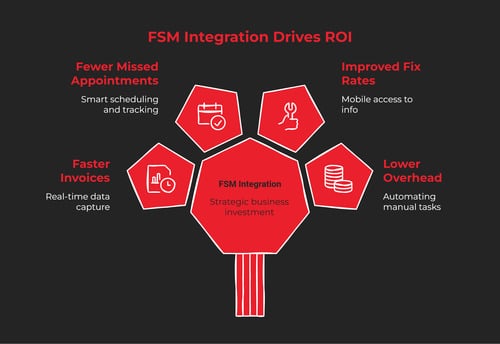
Field Service Management isn’t just a tactical upgrade; it’s a strategic investment. And like any investment, your clients (and you, as a partner) want to see measurable returns.
Here are four ways an FSM-enhanced Business Central environment drives long-term ROI:
- Faster Invoice Cycles: Real-time data capture means service reports are completed faster, pushing invoices out within hours, not days.
- Fewer Missed Appointments: Smart scheduling and technician tracking help reduce no-shows and delays, making the service more reliable.
- Improved First-Time Fix Rates: Mobile access to job history and inventory ensures technicians arrive prepared, reducing costly return visits.
- Lower Admin Overhead: Automating dispatch, reporting, and syncing with the Dynamics 365 Business Central service management reduces manual work.
By helping clients clearly quantify improvements, you position yourself not just as a software provider but as a transformation partner.
Final Thoughts: Create Stickier, Scalable BC Implementations Using FSM
Let’s face it – an ERP system that stops at the office door is no longer enough. Today’s customers expect mobility, automation, and real-time visibility, especially when service delivery is at the heart of their business.
To bridge this gap, many partners are turning to specialized ISV solutions. For example, Praxedo integrates with Dynamics 365 Business Central service management, so you’re not just extending functionality; you’re enabling a more efficient service delivery. You’re helping clients future-proof their operations and your own business model in the process.
Whether you’re a Microsoft partner or a consultant building verticalized offers, FSM is your opportunity to lead, not react.
Want to help your clients streamline service delivery? Contact us or book a demo to see how Praxedo integrates seamlessly with Business Central.
FAQs:
1. What does Business Central provide for service management?
Business Central service management does a good job of managing work orders, contracts, and invoicing, but lacks advanced field service capabilities, such as mobile access and real-time dispatch.
2. Why integrate FSM tools with Dynamics 365 Business Central?
Business Central field service integration allows for real-time coordination between the back office and field teams, enhancing service quality and operational control.
3. What is the best FSM software for Business Central?
Tools such as Praxedo offer specialized functionality, mobile apps, smart scheduling, and reporting that extend Dynamics 365 Business Central service management without replacing it.
4. How do FSM solutions fit into D365 managed services?
FSM tools enhance D365 Business Central managed services, improve customer outcomes, and enable new recurring service offerings for partners.

Our similar articles.
-
- AI in field service management
- ai-powered scheduling
- AI-powered service scheduling software
- field service scheduling optimization
Don’t Just Fill Schedules, Optimize Your Network
August 3, 2026
-
- customer experience
- fsm
- AI
- AI in field service management
Beyond the Algorithm: Why AI Success is About People, Not Just Code
November 10, 2025
-
- fsm
- AI
- AI in field service management
- GenAI
- generative ai
From Theory to Reality: How GenAI Is Finally Making On-Demand Field Service Dispatch Possible
April 26, 2026